Monday, September 19, 2011

Syntactic Tartness for Macro Expansion

One thing that is very natural for Smalltalk image based programming, is to programmatically assemble source and install it into the very same running program. I've been using the RB Change framework to do just that with something I'm working on lately.

To piece together the appropriate source, working with a template source and string, and then fill in the variables is something that's desirable. VisualWorks and Squeak (maybe some other Smalltalk use this same approach?) have an ability to expand templates strings with macro substitution. The template for a setter method might look something like

'<1s>: anObject
<1s> := anObject'

To fill out those fields, you send messages like expandMacrosWith:, expandMacrosWith:with:, expandMacrosWith:with:with:, and expandMacrosWithArguments:.

I am no fan of this API. First, it is too verbose. When I'm looking at template substitution, I don't want a bunch of other longish selectors. They dilute the information I'm trying to glean as I piece together the template and what's being substituted.

Secondly, I find it doesn't scale well when evolving the code. It's common that I start with a simple template in the first cut of code. Something like
    'Hello <1s>' expandMacrosWith: aName

But as I refactor and discover more needs, the need to add parameters arises. As long as I only add two more parameters, I can just use the variants with the additional with: keywords.
'<1s> ^self <2s> <3s>'
expandMacrosWith: aVariableName
with: aBasicAccessingMethod
with: sizeof + 1

As soon, as I go to 4 fields though, I have to change gears and use the expandMacrosWithArguments: API and build the sequence myself. It could be argued that it's best to just always start with this version, but it's the very longest of the selectors. If you're using VisualWorks, and don't have the language syntax for array construction (e.g. {statement. statement. statement.}), then it's even funner, because you can use the Array with:with:with:with: expression, but if you need to move to 5 fields, then you've got to change your code all around again.

Over the years, I've tried a couple of different experiments to make this all something I liked a little better. They've used involved interesting binary selectors (e.g. "%") and proxy objects, or at least fun with doesNotUnderstand: messages. I thought I'd try something a little different. I wanted something that correlated well with the numbered fields, but was uber-terse as well.

So I went with the shortest selector that could possibly work: _1:, _1:_2:, _1:_2:_3:, etc. Written in selector shorthand like that, it's pretty ugly. When actually used in code though, it improves some:
'<1s>At: anOffset
^self <2s> anOffset * <3p> + <4p>'
_1: aVariableName
_2: aBasicAccessingMethod
_3: aByteSize
_4: sizeof + 1

and
'inspector<1s>Field
%<inspectorFields>
^Array with: (Tools.Trippy.DerivedAttribute
label: ''<2s>''
valueBlock: [self <2s>])'
_1: upperVariableName
_2: aVariableName

and
'<1s>
^(0 to: <2p>) collect: [:n | self <3s> <4p> + (n * <5p>)]'
_1: aVariableName
_2: anInteger - 1
_3: aBasicAccessingMethod
_4: sizeof + 1
_5: aByteSize

I don't dare call this syntactic sugar. The use of the underscores is too ugly to be sugary. It's a sort of bitter sweet thing, thus the "tart" label.

It does solve two problems nicely. It is very terse. You see a minimal amount of "scaffolding" getting the job done, and are free to spend more time looking at the template and the substitutions. One could get that though by using inlined arrays with a shorter selector, something like:
'<1s>
^(0 to: <2p>) collect: [:n | self <3s> <4p> + (n * <5p>)]' macro: {
aVariableName.
anInteger - 1.
aBasicAccessingMethod.
sizeof + 1.
aByteSize.}

One thing you lose with this though, is the strong association between each substitution and field. In the former example, when I glance at the template and see field 4, and then want to know what's being substituted, I see it instantly. I just find the 4 in the selector below. Without that direct link, I have to parse the array linearly to find it.

I haven't used this _syntax enough to decide if it's usefulness would overcome its ugliness, but it was interesting to play with it and discover the visual readability aspect. I'll likely use it on some more non-production stuff to get a better feel.

Tuesday, August 23, 2011

I've Inherited an Interesting Dilemma

Consider two browser screenshots. The first is the class side of AlphaBlendedIcons, with the needsComment method selected.


This second is the instance side of NameSpace, the needsComment method selected.


In both cases, if you invoke the menu of the selectors list, and choose the Hierarchy Implementors option, you get the following two results, respectively...


So what's the issue? The issue is the presence of ClassDescription in the Implementors browsers. Should it be there or not?

On the one hand we have the notion of "hierarchy." In RB land, a Hierarchy Browser is a pretty common thing. It is a limited view of classes always going as high as Object. If you are on the instance side, it tops at Object. If you are on the class side, it tops at Object class. From this point, where the term "Hierarchy" refers to a browsing view or scope, it is surprising to see these entries for ClassDescription here when you ask for Hierarchy Implementors. What you expect to see, is only methods that you'd find as you navigated around in the Hierarchy Browser.

Then there is a more pedantic side. It tends to be those who like to think of themselves as "I have ascended into the thirteenth circle of Smalltlak Uber-Knowledge." They know the zen-secret that there's a "crossing of the streams" that occurs at Object class. When a method is not found at Object class, the lookup for the method doesn't stop there, but continues up on the instance side at Class, then ClassDescription, then Behavior, and finally Object (instance). The little up/down arrows we place next to methods, even show this. If you look at the first one, it shows that there is a super implementor of needsComment for AlphaBlendedIcons, that is found farther up the search tree.

These two notions of "hierarchy" when viewed from the class side, are at odds with another. When someone sees that menu option, which kind of "Hieararchy" are they more likely to think about at that moment. Should it be left the way it is, but reword the menu option to be "super/sub implementors?" What would you want it to do?


Thursday, July 21, 2011

OSX Lion: First Day Thoughts

I downloaded and installed Lion yesterday. Mostly, I'm still acclimating before drawing judgements and throwing darts. But one thing stands out already.

There's this great story about how Steve Jobs convinced Bill Atkinson that rectangles with rounded corners were a good thing. The idea being that we as humans tend to prefer them and so would naturally prefer them in our UIs. The rest is history. Over the years, more and more of our UI elements get sanded off corners.

There is another pendulum that's been swinging along the Apple UI Design vector that annoys me. Color. Or lack thereof. It's no secret that Apple uses some of its frontline apps to feel out UI evolutions. Back in 2006, I remember discussing the latest iTunes version, and describing what I saw as an attempt on Apple's part to create "Lickable Motiff."

The first thing that keeps hitting me with the subtle changes made to Mail and Finder, are that they both seem to have been through another bleach cycle. Mails top button bar has had all hue rinsed from it. Finder's side bar is nearly colorless. I keep thinking "Those icons are just glyphs from some foreign language. Ignore them." Maybe I should just spend more time in Terminal and use good ol' ls.

I understand some of the influences that drive Apple designers to do this. It's easier to harmonize sets of icons if you use less colors. It helps deal with colorblindness issues. Etc.

On the other hand... I'd like to take the Apple UI designers on a walk around their campus. And point at things. And say "See? Color!" If we get rounded rectangles (problematic as they are to graphics libraries) because they show up in real life, why can't we have some color too?

Who knows, maybe everyone at Apple wears black turtlenecks now, and they all really see less color. Yeah, maybe that's it.

Thursday, July 14, 2011

Rope: an evolved Chain

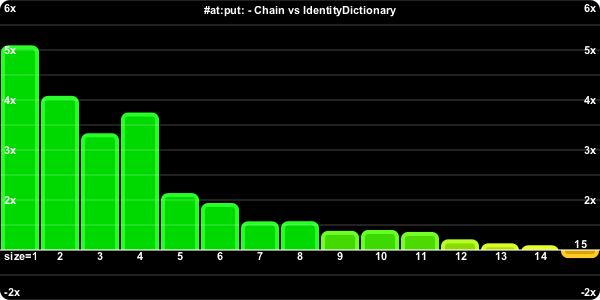
One of the areas my Chain did not come out ahead was in the area of adding truly new keys to a Dictionary (as opposed to just updating what already was stored at a given key) or removing them. Both of these operations potentially involve #become: sends. While VisualWorks #become: is very fast, it's not as fast as some other operations. And not all Smalltalk implementations have a fast #become:. Here's the chart of how well Chain compared to IdentityDictionary for original key add/removal.


While I was on vacation, John Brant pinged me encouraging me to use a #changeClassTo: strategy instead of #become:. To do so, first I cloned the Chain class as a new class called Rope (and the Empty variant as well).

Then we make EmptyRope a subclass of Rope. This is important, because we need an EmptyRope to have the same instance variable layout as a Rope. #changeClassTo: will only change the type or class of an object, if they have the same instance variable layout. We'll just make sure that never actually set or reference the key, value, or nextKnot variables in the EmptyRope subclass.

In the case of adding a new key/value pair, when our #at:put: reaches the end of the list, the EmptyRope subclass can just implement it as
at: aKey put: anObject
self
setKey: aKey
value: anObject
next: EmptyRope basicNew.
self changeClassTo: Rope
And the only thing #removeKey: has to do in addition to the original #replace: trick is do a
   previousKnot changeClassToThatOf: self
to get the last link to be an EmptyRope.

Most of the rest of the code stays the same. We can reduce a couple of duplicates since the classes are now in a parent-child relationship, rather than a sibling one.

The at:put:/removeKey: test is the interesting one to rerun and see how things fair. First of all, we compare the new Rope approach to the original Chain one.


That shows some improvement across the board. The real test though, is how does it compare to the original IdentityDictionary?


The good news is, it's actually faster. Not by a huge amount. But it removes it from something you have to worry about.

I've replicated the Rope code up to the Open Repository (package TAG-Ropes). If you know you're using smallish dictionaries (size <= 15) and need to care about performance, then this might be the thing for you.

It would be interesting to see how such an approach fared in GNU Smalltalk or one of the other Smalltalks.

Wednesday, July 13, 2011

Syntax Highlighting your Blog with highlight.js

I've had some people ask me how I got syntax highlighting for Smalltalk code on my blogger blog. Here's what I did:

  1. Download highlight.js

    Go to Software Maniac's download page. Turn off the languages you're not interested in. Check the checkbox for Smalltalk. And hit the download button. You'll get a zip file that when unarchived has a whole directory structure of files, including the customized highlight.js file for your efforts. You need this customized version because it doesn't support Smalltalk in the stock version.

  2. Host it somewhere

    Find a net presence to host it at. Hopefully, you've either got your own or know someone who can host it for you. I was fortunate to fall into the second category.

  3. Update your blog template

    Edit your blog template (in Edit HTML link under the Design tab of your blog. You add the following lines near the end of your template

    <script src="http://yourhostedsite/highlight.pack.js" type="text/javascript">
    <script type="'text/javascript'">
    hljs.initHighlightingOnLoad();
    </script>

    You need to edit the yourhostedsite part appropriately.

  4. Add additional CSS for your blog

    You need to choose a css style you like from the downloaded package's style directory. Then use Design -> Template Designer -> Advanced -> Add CSS (at the bottom) and paste the contents of your preferred styles .css file into that.

  5. Enclose code blocks appropriately

    To have the highlighter apply to a chunk of code, you place your code in between pre and code tags. E.g.

    <pre><code>
    ...smalltalk code snippets...
    </code></pre>

At least... that's how I remember how I did it. It's been a month or so now. Hope that helps. And would love to hear of errors/corrections in the above.

Making Performance Comparison Charts

My last post was submitted just before embarking on a multi-week multi-state driving family vacation. While I was gone, I received a couple of requests regarding the code actually used to draw the performance comparison charts in that post.

I used CairoGraphics to do it. Those that know me are likely not surprised by this. The code is just a big workspace blob, and is somewhat procedural.

One of the challenges I wrestled with was how to turn numbers the numbers into percent increase or decreases. The easy method of just dividing one value by the other gives values that are not linear when drawn graphically. Or put another way, that is twice as fast draws differently than something that is twice as slow.

I used this fun snippet to convert from aTime and bTime values into such a comparison:


(((originalTime max: newTime) /
(originalTime min: newTime)) - 1.0) * (originalTime - newTime) sign


The large workspace blob that works with a variable called percents follows below, I put comment annotations to delineate the various sections. It may serve as a useful Cairo snippet.


| max min surface bandHeight xInc text extents y |

"compute some dimensions and create the surface"
max := (percents fold: [:a :b | a max: b]) ceiling max: 0.
min := (percents fold: [:a :b | a min: b]) floor min: 0.
surfaceHeight := (max - min) * 75 min: 300.
bandHeight := surfaceHeight / (max - min).
surface := ImageSurface format: CairoFormat argb32
extent: 600 @ surfaceHeight.
xInc := surface width / percents size.

surface newCairoContextWhile:
[:cr | | matrix |

"setup a default font"
cr
selectFontFace: 'Arial'
slant: FontSlant normal
weight: FontWeight bold.

"flip the coordinate system so we draw from the bottom up, rather than normal y is down style"
cr fontSize: 11.
cr translate: 0 @ surface height.
cr scale: 1 @ -1.
matrix := cr fontMatrix.
matrix scale: 1 @ -1.
cr fontMatrix: matrix.

"do rounded clip/border"
cr rectangle: (Point zero corner: surface extent) fillet: 10.
cr clipPreserve.
cr source: ColorValue black.
cr fill.

"shift up to base line"
cr translate: 0 @ min * bandHeight negated.

"draw columns"
percents keysAndValuesDo:
[:size :percent |
| rectangle baseHue x |
cr saveWhile:
[cr
rectangle: (Point zero
extent: surface width @ (percent positive ifTrue: [max] ifFalse: [min])
* bandHeight)
regular.
cr clip.
rectangle := Rectangle
left: (size - 1) * xInc + 3
right: size * xInc - 3
top: 5
bottom: -5.
percent > 0
ifTrue: [rectangle top: percent * bandHeight]
ifFalse: [rectangle bottom: percent * bandHeight].
cr rectangle: rectangle regular fillet: 5.
baseHue := (1 / 6 + (percent / 3) min: 1 / 3) max: 0.
cr source: (ColorValue hue: baseHue saturation: 1 brightness: 0.85).
cr fillPreserve.
cr source: (ColorValue hue: baseHue saturation: 0.85 brightness: 1).
cr strokeWidth: 4.
cr stroke].

"draw the column label"
text := size printString.
size = 1 ifTrue: [text := 'size=' , text].
extents := cr textExtents: text.
x := (size - 0.5) * xInc - extents width half.
y := percent positive ifTrue: [extents height negated - 2] ifFalse: [2].
y := y max: min * bandHeight + 2.
cr moveTo: x @ y.
cr source: ColorValue white.
cr showText: text].

"draw axis lines"
min to: max
by: 1 / 2
do:
[:n |
cr moveTo: 0 @ (n * bandHeight).
cr lineTo: surface width @ (n * bandHeight)].
cr source: ColorValue white.
cr strokeWidth: 0.25.
cr stroke.

"draw axis"
cr source: ColorValue white.
min to: max
do:
[:n |
n isZero
ifFalse:
[text := (n + n sign) printString , 'x'.
extents := cr textExtents: text.
y := ((n * bandHeight max: min * bandHeight + 4 + extents height half)
min: max * bandHeight - 4 - extents height half) - extents height half.
cr moveTo: 4 @ y.
cr showText: text.
cr moveTo: (surface width - 4 - extents width) @ y.
cr showText: text]].
cr moveTo: Point zero.
cr lineTo: surface width @ 0.
cr strokeWidth: 1.
cr stroke.

"draw label"
text := '#at:put: - Chain vs CompactDictionary'.
extents := cr textExtents: text.
cr moveTo: (surface width half - extents width half)
@ (max * bandHeight - 4 - extents height).
cr showText: text].

"write the file"
surface writeToPng: 'chart.png'

Thursday, June 23, 2011

Kicking the Hash out of Dictionary

What Led to This Post

First of all, it was that I needed a break. I've been working on ARs, doing some embedded Linux stuff, working on Skinned Scrollbars, and Uniscribe at the same time. So yesterday afternoon, I thought I'd like to take a little journey.

One of the patterns that has become kind of popular in VisualWorks of late is the "Properties Dictionary". There are some drawbacks to them, but one of advantages is they allow for a sort of "poor man's instance variable pool." Using them, one can store state by by name, in a structure that isn't quite as established as standard instance variables. Package's use them. Various parts of the RB use them. VisualPart's use it.

These dictionaries have a similar usage pattern. They tend to be smaller in size. Their primary usage tends to be at:(ifAbsent:) and at:put:, where the keys are usually someone constant. Or in other words, the majority of the time, at:put: is replacing an existing value, rather than adding a new slot to the dictionary.

Which led to a bigger question even. Even without worrying about the consistency of keys, what about small dictionaries in general?

Are small dictionaries that common?

Here's a bit of code we can use to get a view on that question:


histogram := Bag new.
Dictionary allInstancesDo: [:each | histogram add: each size].
IdentityDictionary allInstancesDo: [:each | histogram add: each size].
histogram

Exporting the data and playing with GoogleDocs a bit, we come up with this:

At least in my image, smaller dictionaries actually take up more space then the large dictionaries (area under the red curve is greater than that of the blue curve). And obviously, there's a lot more of them than the larger dictionaries.

Another kind of analysis (which I did not do) would be to look at what the access rates of dictionaries are as a function of their size. In other words. Are we sending messages as often to the big dictionaries as we are the small ones?

Some Points of History

Seeing that optimizing smaller dictionaries is an interesting pursuit, is not a new idea. The original Refactoring engine sported a specialized RBSmallDictionary. It exploited the fact that for its use cases, the sizes were usually only one or two. The overhead of hashing, probing, etc wasn't really worth it for these usually-one-element dictionaries. Having their own, also allowed them have a specialized removeAll that was very fast.

When Steve Dahl added CompactDictionary for UCA, it looked close enough to RBSmallDictionary, that dropped RBSmallDictionary in favor of it. Both implementations are basically linear search dictionaries.

Over the last few releases, there have been a number of changes to hashing algorithms and Dictionary implementations in VisualWorks, primary instigated by Andres Valloud, which have changed the value of CompactDictionary/RBSmallDictionary as well. Take a look at the speed boost of CompactDictionary versus IdentityDictionary when sending #at: with Symbols as keys.
It's basically a draw at this point. The #at:put: story shows a moderate benefit for using a CompactDictionary over an IdentityDictionary when your size is 4 or less.

I'm told, that in the way-back-machine, VSE played games with optimizing small dictionaries. I don't have any more details than that though, and would love it if someone could speak truth to that rumor.

#at:(put:) Considered Harmful

The conventional wisdom to gain better dictionary performance is to work on hash algorithms. Make them faster. Make them separate better. Certainly that work will yield results. I think Andres's work has shown commendable efforts in those areas.

Sometimes we have to step out of our box and think about the problem from a different view point though. All of the improvements in hash algorithms ignore another important aspect of Smalltalk optimization. At the end of the day, all of this work on Dictionary will still result in the low level primitives for at: and at:put: running. Not the dictionary methods, but the one that is like the one found on array


anArray at: 4 put: anObject

The problem with this is that Smalltalk VM's want to be very safe. A bit of work is done every time the at:(put:) primitives fire. First, the VM wants to make sure you passed it an integer. And then it wants to convert your Smalltalk integer representation into a machine one. And then it wants to make sure that number is greater than one, and less than the current size of the variable sized receiver. That means it has to go fetch the current size first. And if that's all OK, then it wants to figure out what the real offset is from the header of the object. So it has fetch how many fixed fields it has first, and then add that to the offset. And now it can finally assign a pointer in the objects body to the object being stored at that slot. Oh yeah, there's a check in there to determine if size was really big, then the body of the object is in LargeSpace. You do this kind of work for every single at: and at:put: you do, whether indirectly or indirectly. A higher level Dictioanry>>at:put: will have to first compute a hash, then candidate insertion point, and then probe via a low level at: to see if it has a collision or existing value, and then eventually do an at:put: when it gets everything straightened out. And there's the overhead of just sending the message.


How much slower is indexed access than fixed variable access? It's easy to write a little snippet that will give us a hint


| point array index |
fixed := 3 @ 4.
array := Array new: 1000.
index := '888' asNumber.
[100000000 timesRepeat: [array at: index]] timeToRun asMicroseconds
asFloat / [100000000 timesRepeat: [point y]] timeToRun asMicroseconds

I get around 60% slower for VW 7.9 builds. But this is only a hint. It's not correct really. Because the point y expression doesn't just measure fixed var access, but also a message send. So in reality, the disparity is farther. I noodled about this for a while, I'm curious if anyone has a better way of comparing the two access methods in a truer measure. Basically, what we want to compare is the speed of the byte code to "push a known index" vs the speed of the #at: send.

A Dictionary with Fixed Slots

This is something I've wanted to try for a while. A linked list implementation where each link exposes a dictionary like interface. I tried to come up with a good name for this thing, and then gave up and called it Chain. It's actually implemented with two polymorphic classes. Here's what a Chain with two elements looks like

Chain and EmptyChain end up having the same basic set of methods. Both inherit from Collection. Most of the methods are a fun exercise in recursive programming. For example, here's the two #at:ifPresent: implementations


at: aKey ifPresent: aBlock
^key = aKey
ifTrue: [aBlock value: value]
ifFalse: [nextLink at: aKey ifPresent: aBlock]

and


at: aKey ifPresent: aBlock
^nil

In fact most of the EmptyChain methods do simple things like raise an error, return nil, return a copy, or do nothing. The two that are kind of fun are #at:put: and #removeKey:.

Chain #at:put:

The Chain implementation of #at:put: is simple:

at: aKey put: anObject
aKey = key
ifTrue: [value := anObject]
ifFalse: [nextLink at: aKey put: anObject].
^anObject

This will handle the cases where we already have aKey in our Chain and just want to update the value stored at that key. When we have a new key though, it will make it through to the EmptyChain implementation:

at: aKey put: anObject
| newLink |
newLink := Chain basicNew.
newLink setKey: aKey value: anObject next: newLink.
self become: newLink

There's a at least two interesting things going on here. The firs is that we use basicNew to instantiate a new Chain link. The reason is that Chain new redirects to EmptyChain new by default. Since a "new Chain" should be an empty one.

Since an EmptyChain link doesn't know who references it, we use a #become: to insert the new link in the chain. We could implement these two classes as a doubly linked list, but that requires more space, more management, and VisualWorks #become: is very fast. The trick in using the #become: is that we initially set the newLink's nextLink var to point back to itself. Before we do the #become:, we have another link pointing to the EmptyChain, or perhaps it really is an empty chain, and application code is referring to the EmptyChain instance as the head of the collection. And now we have a new link pointing to itself. After the #become: call, the previous link (or application code) now points to the new link, rather than the empty chain. But we also want the new link to have a nextLink that points to the original EmptyChain. Since the #become: is two way, the new link's reference to itself, is now referencing the terminating EmptyChain.

Chain #removeKey:

John Brant and Don Roberts once shared this riddle with me. "How do you delete a single link in the linked list with a pointer only to the link you want to delete?" The apparent conundrum, is that without knowing what the previous link was, how do you update its nextLink pointer to reference the nextLink of the link to be deleted. The answer is, that you don't. Instead, what you do is turn yourself (the link to be deleted) into the next link by copying its key and value to yourself, and then updating your nextLink to the be nextLink of what you just copied. So in essence what you do, is turn yourself into a clone of the next link, and then remove the now redundant nextLink from the link chain.

This ends up being a polymorphic implementation of a private method called used to #replace: aPreviousKey. The Chain implementation is easy enough:

replace: aPreviousLink
aPreviousLink setKey: key value: value next: nextLink

When we're removing the last normal link of the Chain though, the one that points to the terminating EmptyChain, that one basically does the reverse of the at:put:, using the self referential link + become: trick to change places.

replace: aPreviousLink
aPreviousLink
loopSelf;
become: self

Does it Make a Difference?

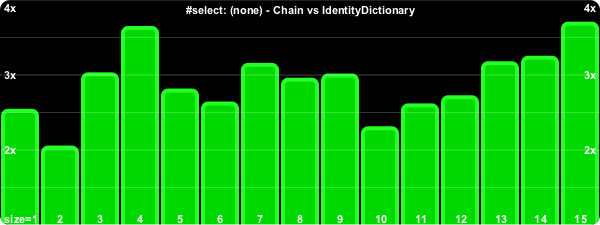
Chain and EmptyChain were a lot of fun to code up. Where I was interested in Dictionaries of sizes around 10 or less, it was a really fun way to approach the problem. I did go into this wondering about performance though. How does it stack up against normal Dictionary usage? What follows are a series of performance graphs for different dictionary APIs. In most cases I used Symbols, they have the cheapest hash and = implementations, so we don't get lost in worrying about the overhead of those. Most of the charts show results for Dictionary sizes ranging from 1 to 15.

Accessing Methods


The (positive) indicates that the key was found, or in other words that the exception block was not followed. (negative) indicates the exceptional block was evaluated.

The performance for the negative path deteriorates sooner, because we have to traverse the whole chain to discover it's not there, so it becomes a function of the chain size.


There's a bit of sawtoothing to this chart. It occurs (in part) because these APIs are inherently dependent on the actual Dictionary size, for the Dictionary case. Not reported size, but the amount of memory allocated behind the scenes for a Dictionary of that size. The actual #basicSize of the 1-15 sized Dictionaries is #(3 3 7 7 7 17 17 17 17 17 17 17 37 37 37).


#size is the bane of our singly linked list. For a Dictionary, it's just a return of the tally instance variable. But the Chain has to enumerate all of its links each time to compute the current size. As the chain gets longer, it takes more and more time to compute the size.

Enumerating

I wasn't as exhaustive with this set, I figured by now the picture was becoming clear.


#reject: is the same as #select:.

Removing

Removal is tricky to time. We need full dictionaries to remove from. It's actually the same problem as found with timing the #at:put: of initially new keys. So married the two together by measuring the time it takes to remove an existent key and then add it back.

The Chain pays a heavy price in this one because #at:put:'ing a new item involves allocating a new link, as well using #become: to insert it. As a net, that's a little slower than the IdentityDictionary which doesn't need to allocate each time.

On Beyond Dictionaries

We could do more of the Dictionary APIs, but I think the above charts are more than enough to get the picture. For things like property Dictionaries, where unique keys are determined early on, and the size is usually small, an object like Chain can offer a bit of performance boost (if you've determined you're in a speed crunch; remember "Make it Work. Make it Right. Make it Fast.").

Chain has some other interesting properties though. Unlike Dictionary, Chain can use nil as a key. And unlike Dictionary, order is preserved. At least, the order that you add the initial keys. As a Chain grows, its enumeration order doesn't change. This brings to light an interesting possibility. What if we used a Chain in place of an OrderedSet? We could make something like Chain that left the values out, or just put nil in for the values and simply use the various key APIs. For small OrderedSets we'd likely get a significant speed jump.

Why stop with OrderedSet emulation though. Dictionaries are just generalized Sequences. Or put another way, a Sequence (e.g. Array, OrderedCollection, etc) is just a special kind of Dictionary that limits its keys to a contiguous range of integers starting at 1 and ending at some size. It turns out that making Chain respond to Sequence APIs such as #first, #last, #first:, #last:, #allButFirst:, #allButLast:, #any, #fold:, #reverse, #reverseDo: is a snap.

Want an growable array that can #do faster than an array? Check this out:

In a variety of scenarios, the Chain will actually perform on par or faster with Sequences. Just don't send #size to them.

Other Thoughts


One could do a number of different things past this point. One could make different kinds of Chain subclasses for identity behavior versus equality. The trick one could use is to have the EmptyDictionary know the kind of class to use for normal links.

One could avoid the use the clever #become: trick to add and remove links, by creating private helper methods that the basic APIs called on, passing the necessary state along to do the work without resorting to clever #become: incantations.

One could play with having Chain links that stored more than one key->value pair in fixed instance variables. This would reduce the amount of link traversal via message sends relative to fixed var access, though code complexity would need to increase as it had to deal with partially populated links.

Lastly, one has to keep in mind what this exploration has been about. It's been about using fixed var access in preferences to indexed variables. And in never sending #hash to the keys, sending = only instead. The value of not using the #hash, goes down though as #hash methods get faster while = methods get slower. In other words, if you're keying with objects that have lengthy equality comparisons and fast hash comparisons, the inflection point in size where the Chain technique wins out over a traditional hash approach will shift to the left.